

How do I register with Refill Rx?
The entire registration process is just three simple steps.
- Locate a Family Pharmacy Group location - Enter both the zipcode and last four of your pharmacy's phone number. Once you have created an account, you can add all three Family Pharmacy Group locations if you would like.
Pharmacy Last 4 of Phone# Zip Code Family Pharmacy of Russellville 5545 35653 Hometown Pharmacy 7400 35653 Family Pharmacy of Littleville 4021 35654 - Authenticate yourself - You must submit information already on file with your pharmacy. If you have an old Patient ID, you can use this to authentiate yourself. If you do not, you must submit details to assist in "matching" you with your pharmacy. If for some reason you do not have a match, contact your pharmacy to ensure that you are using correct information.
- Create username and password - After matching successfully, create a username and password once. This will be your new login to gain access to your prescriptions online.
Refill your prescriptions
on the go.
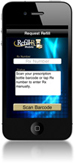 Refill your prescription with a mobile device in seconds. Simply scan the barcode on your prescription bottle and watch as RefillRx Mobile sends your request to us. If a barcode is not available you can also simply enter the Rx number for your prescription and search for your pharmacy by entering the phone number.
Download: